Our software essentially helps engineers to create, edit and test flow diagrams. For this purpose, our application provides a user interface, which especially aids in visualizing such a diagram.
Microsoft Windows, .NET, C#, WPF Framework, MVVM
The goal of this project is to provide engineers with an graphical user interface that will help them create, edit and test flow diagrams. An external computation program already exists which does all the calculations. By entering all parameters directly into the user interface, the engineer is guaranteed a high degree of flexibility and ease of use. Additional features, such as saving and opening flow diagrams, allow later modification to an existing project as well as derivation for other projects. Especially the automatic output of an input file for the existing computation program will significantly speed up the design process and reduce the error rate.
Up until now, the engineers at Birr Machines have been writing the text file needed for the existing computation program themselves. Thus, many aspects had to be kept in mind and small mistakes often occurred while creating the text file. In addition, the text file is very complex and not very understandable, which complicates the integration of new employees. This procedure is no longer up to date and requires a large amount of time for the engineer. Especially since the process must be performed iteratively.
The figure below shows a visualized flow diagram, displayed in the final running software.
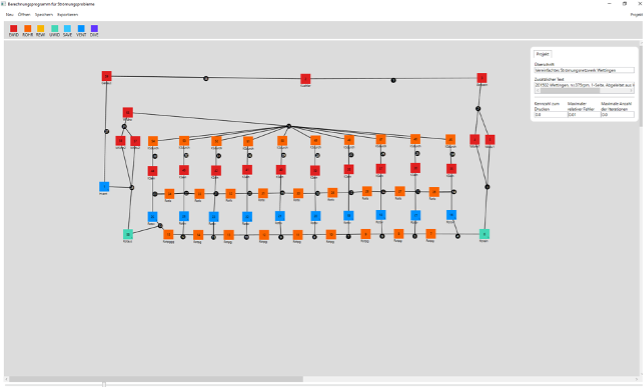
A flow diagram consists of several elements, colored boxes in the Figure 1 above, which are interconnected, shown as a black line. An element has one element type at a time, indicated by the color. Using the navigation bar, shown in the top left of the Figure 1, new elements can be added to the flow diagram through drag and drop. Afterwards, elements can be moved by holding down left click. A single left click selects the element and shows the definable parameters. Here the physical properties, for example the density, of the selected element can be specified and, among other things, support point functions can be added. Further, two single right-clicks on different elements create a connection including a node between them. Elements, as well as nodes, can also be deleted. Also, different values can be defined for a flow diagram specifically, shown in the top right of Figure 1. Diagramms can be stored to files and reopened. For further processing of the flow network data, a textual input file to an existing computation program can be generated. It is therefore crucial that the format in the text file is accurate so that the existing computation program can successfully retrieve all the needed data. Finally, the software features zooming and scrolling, shown in figure above at the bottom and on the right, in order to manage small as well as large diagrams more efficiently.
Project duration: 17. September 2021 - 21. Januar 2022
Total effort: 250 hours
Teamsize: 1 person
Birr Machines AG
birr-machines.com
Joshua Schärer, joshua.schaerer@students.fhnw.ch
Wolfgang Weck, wolfgang.weck@fhnw.ch